OData
- Supercharging ASP.NET Core API with OData
- Simplifying EDM with OData
- Nouvelle page
- OData Query Syntax
Supercharging ASP.NET Core API with OData
Summary
In this article, I’m going to show you how you can supercharge your existing ASP.NET Core APIs with OData to provide better experience for your API consumers with only 4 lines of code.
For the purpose of this tutorial please clone our demo project WashingtonSchools so you can follow up and try the different features we are going to talk about in this article.
You can clone the demo project from here:
https://github.com/hassanhabib/ODataDemo
What is OData?
Let’s talk about OData …
OData is an open source, open protocol technology that provides the ability to API developers to develop Queryable APIs, one of the most common things API developers need is pagination for instance.
With OData you can enable pagination, ordering of data, reshaping and restructuring of the data and much more with only 4 lines of code.
One of the most common scenarios today is when developers call an endpoint and pull out data that they are going to filter, reshape and order later on the client side. This seems a bit wasteful. especially if the data is large enough that could cause latency and require further optimizations for a better user experience.
Getting Started
To get this started, this tutorial assumes you already have an API that provides some list of objects to your end users, for the purpose of this tutorial, we are going to use a sample WashingtonSchools API project that we built to demonstrate this feature.
Our API endpoint api/students returns all the students available in our database.
To enable OData on that endpoint, we are going to need to install a nuget package for all OData binaries that’ll enable us to turn our endpoint into a Queryable endpoint.
The nuget package we are targeting here is:
https://www.nuget.org/packages/Microsoft.AspNetCore.OData
Once that’s installed, let’s go ahead and add OData services to our API.
To do that, go to: Startup.cs file and add in this line of code in your ConfigureServices Function:
services.AddOData();Now we need to enable the dependency injection support for ALL HTTP routes.
To do that, in the same file Startup.cs let’s go to the Configure function and add these two lines of code:
app.UseMvc(routeBuilder => {
				routeBuilder.EnableDependencyInjection();
				routeBuilder.Expand().Select().OrderBy().Filter();
});
The first line of code enables the dependency injection to inject OData services into your existing API controller.
The second line of code determines which OData functionality you would like to enable your API consumers to use, we will talk about Expand, Select and OrderBy in details shortly after we complete the setup of OData on your project.
The last line of code we would want to add is an annotation on top of your API controller method, in our example here, we have a StudentsController class that has a GetStudents method to server all the available students in our database.
Now all we need to do is to add this annotation on top of your GetStudents endpoint as follows:
[EnableQuery]
So your controller method code should look like this:
[HttpGet]
[EnableQuery]
public IEnumerable<Student> GetStudents(){
return this.context.Students;
}
Now that the setup is done, let’s test OData select, OrderBy and expand functionality.
Select
On your favorite API testing software or simply in the browser since this is a GET endpoint, let’s try to select only the properties that we care about from the students objects.
If the students object consists of an ID, Name and we care only about the Name, we could call our endpoint like this:
api/students?$select=Name
The results will be a json list of students that only has the Name property displayed. try different combinations such as:
api/students?$select=ID,Name
The select functionality enables you to control and reshape the data to fit just your need, it makes a big difference when your objects hold large amounts of data, like image data for instance that you don’t really need for a specific API call, or rich text that is contained within the same object, using select could be a great optimization technique to expedite API calls and response time.
OrderBy
The next functionality here is the OrderBy, which allows you to order your students based on their names alphabetically or their scores, try to hit your endpoint as follows:
api/students?$orderby=Name
You can also do:
api/students?$orderby=Score desc
Expand
One other functionality we want to test here is the expand. The expand functionality comes with a great advantage since it allows navigation across multiple entities.
In our example here, Students and Schools are in a many-to-one relationship, we can pull the school every student belongs to by making an expand call like this:
api/students?$expand=School
Now we get to see both students and their schools nested within the same list of objects.
Filter
The last functionality here is the Filter. Filtering enables you to query for a specific data with a specific value, for instance, If I’m looking for a student with the name Todd, all I have to do is to make an API call as follows:
api/students?$filter=Name eq ‘Todd’
The call will return all students that have the name Todd, you can be more specific with certain properties such as scores. For instance: if I want all students with scores greater than 100, I could make the following API call:
api/students?filter=Score gt 100
There are more features in OData that enables even more powerful API functionality that I urge you to explore such as MaxTop for pagination.
Final Notes
Here are few things to understand about OData:
- OData has no dependency whatsoever on the entity framework, it can come in handy with EF but it doesn’t depend on it, here’s a project that runs an OData API without EF: https://github.com/hassanhabib/ODataWithoutEF
- OData can give you more optimization with EF if you use IQueryable as a data return type that IEnumerable since IQueryable only evaluates after the query is built and ready to be executed.
- OData is much older than any other similar technology out there, it was released officially in 2007 and it has been around since then being used in large scale applications such as Microsoft Graph which feeds most of Microsoft Office products and XBOX in addition to Microsoft Windows.
The Future of OData
OData team continues to improve the feature and make it even easier and simpler to use and consume on existing and new APIs with both ASP.NET Web API (classic) or ASP.NET Core and we are working on adding even more powerful features in the near future.
Simplifying EDM with OData
Summary
In a previous article, I talked about how you can leverage the power of OData with your existing ASP.NET Core API to bring in more features to your API consumers.
But there are different ways you could enable OData on your existing API that are just as simple but offers more powerful features than overriding your existing routes and enabling dependency injection.
For instance, if you’ve tried to perform a count operation using our previous method you will notice it doesn’t really return or perform anything, the same thing goes with many other features that we will talk about extensively in future articles.
In this article, however, I’m going to show you how you can enable OData on your existing ASP.NET Core API using EDM.
What is EDM?
EDM is short for Entity Data Model, it plays the role of a mapper between whatever data source and format you have and the OData engine.
In other words, whether your source of data is SQL, Cosmos DB or just plain text files, and whether your format is XML, Json or raw text or any other type out there, What the entity data model does is to turn that raw data into entities that allow functionality like count, select, filter and expand to be performed seamlessly through your API.
Setting Things up
Let’s set our existing API up with OData using EDM.
First and foremost, add in Microsoft.AspNetCore.OData nuget package to your ASP.NET Core project.
Once the nuget package is installed, let’s setup the configuration to utilize that package.
In your Startup.cs file, in your ConfigureServices function, add in the following line:
services.AddOData();
Important Note: This will work with ASP.NET Core 2.1, if you are trying to set this up with ASP.NET Core 2.2, then you must add another line of code as follows:
services.AddMvcCore(action => action.EnableEndpointRouting = false);
OData doesn’t yet support .NET Core 3.0 – at the time of this article, .NET Core 3.0 is still in preview, OData support will extend to 3.0 once it’s production ready.
Once that part is done, let’s build a private method to do a handshake between your existing data models (Students in this case) and EDM, as follows:
private IEdmModel GetEdmModel()
{
var builder = new ODataConventionModelBuilder();
builder.EntitySet<Student>("Students");
return builder.GetEdmModel();
}
The student model we are using here is the same model we used in our previous article, as a reminder here’s how the model looks like:
public class Student
{
public Guid Id { get; set; }
public string Name { get; set; }
public int Score { get; set; }
}
Now that we have created our EDM method, now let’s do one last configuration change in the Configure method in our Startup.cs file as follows:
  app.UseMvc(routeBuilder =>
    {
        routeBuilder.Select().Filter().OrderBy().Expand().Count().MaxTop(10);
        routeBuilder.MapODataServiceRoute("api", "api", GetEdmModel());
    });
Just like our last article, we enabled the functionality we needed such as select, filter and order by then we used the MapODataServiceRoute method to utilize our EDM method.
We used “api” instead of “odata” as our first and second parameters as a route name and a route prefix to continue to support our existing APIs endpoints, but there’s a catch to that.
Your contract in this case will change, if your API returns a list of students like this:
[
  {
    "id": "acc25b4f-c53d-4363-ad33-e0c860a83a1b",
    "name": "Hassan Habib",
    "score": 100
  },
  {
    "id": "d42daeb4-37d7-4a20-9e9b-7f7a60f27ff6",
    "name": "Cody Allen",
    "score": 90
  },
  {
    "id": "db246814-d34e-40e4-aa00-b9192cec447b",
    "name": "Sandeep Pal",
    "score": 120
  },
  {
    "id": "c4e9efc9-40b7-4a85-b000-ce9c076fcd57",
    "name": "David Pullara",
    "score": 50
  }
]
With the EDM method, your contract will change a bit, your response will have some helpful metadata that we are going to talk about, and it will look like this:
{
  "@odata.context": "https://localhost:44374/api/$metadata#Students",
  "value": [
    {
      "Id": "9cef40f6-db31-4d4c-997d-8b802156dd4c",
      "Name": "Hassan Habib",
      "Score": 100
    },
    {
      "Id": "282be5ea-231b-4a59-8250-1247695f16c3",
      "Name": "Cody Allen",
      "Score": 90
    },
    {
      "Id": "b3b06596-729b-4c6f-b337-7ad11b01371b",
      "Name": "Sandeep Pal",
      "Score": 120
    },
    {
      "Id": "084bd81e-b8a2-471d-8396-ace675f73688",
      "Name": "David Pullara",
      "Score": 50
    }
  ]
}
That extra metadata is going to help us perform more operations than the old method.
In that case if you have existing consumers for your API, I recommend introducing a new endpoint, version or informing them to change their contracts, otherwise this will be a breaking change.
The other option is to change your route name and route prefix parameters to say “odata” instead, which is the standard way to implement OData.
The last thing we need to do to make this work for us is removing the notations on top of your existing API controller class, in our case we will remove these two lines:
[Route("api/[controller]")]
[ApiController]
And don’t forget to add the enabling querying annotation on top of your API method:
[EnableQuery()]
Putting OData into Action
Once that’s done, now you can try to perform higher operations using OData like Count for instance, you can call your endpoint with /api/students?$count=true and you should get:
As you can see here, you have a new property @odata.count that shows you the count of the items in your list.
Final Notes
Now that you’ve learned about the simplest way (8 lines of code) to create a handshake between ASP.NET Core, OData and EDM here’s few notes:
- EDM doesn’t have any dependency on the Entity Framework, in fact the whole purpose of creating an EDM is to link whatever data you have in any format it may be to the OData engine and serialize the results through an API endpoint.
- EDM can only be useful if you need some specific OData features such as count and nextlink and so many other features that we will explore in future articles.
- There’s more to learn about EDM, I encourage you to check all about EDM in this extensive, comprehensive documentation.
- OData is an open-source project, I encourage you as you benefit from it’s amazing features to contribute to the project, suggest new features and participate with documentation and your experiences to keep the community active and useful for everyone.
- You can clone the project I built and try things out from this github repo.
Nouvelle page
OData as an API technology comes in with so many options that gives API consumers the power to shape, filter, order and navigate through the data with very few lines of code.
In my previous articles I talked in details about how to enable OData on your existing ASP.NET Core API using the EDM model, in addition to that I have provided a code example for you to be able to test the capabilities of OData on your own machine.
In this article, I suggest you keep the very same source code handy to learn more about one of the most powerful query options of OData, which is $select
Introduction to OData $Select
OData $select enables API consumers to shape the data they are consuming before the data is returned from the API endpoint they are calling.
For instance, let’s assume you have an API that returns information about all students in Washington Schools.
The Student model is defined as follows:
public class Student
{
  public Guid Id { get; set; }
  public string Name { get; set; }
  public int Score { get; set; }
  public byte[] Diploma { get; set; }
}
In the student model above, a service that requires only students’ Names and Ids doesn’t need to pay the network latency tax for transferring the rest of the data an student object may contain.
For instance, the Diploma is of type byte[], which can contain up to 2 GB of data or 1 billion characters, in a network transportation process this could add up and cause a less than optimal service to service communication.
With OData select, you can only define the object members that you need for your process, this can be simply achieved by making the following API call:
https://localhost:44374/api/students?$select=Id, Name
The expected return value of a call like this would be as follows:
{
"@odata.context": "https://localhost:44374/api/$metadata#Students(Id,Name)",
"value": [
{
"Id": "1fa0248e-befa-4999-9c74-9c23dd747c63",
"Name": "Ken Swan"
},
{
"Id": "1833bb68-00f4-4133-913d-2394e90798ea",
"Name": "Kailu Hu"
},
{
"Id": "02acb647-b8cd-477a-a54f-ebad5a9ccdf6",
"Name": "Jackie Lee"
},
{
"Id": "5cda4467-72ae-4c86-919e-56fa902d9095",
"Name": "Vishu Goli"
}
]
}
Performance Advantages of Using OData
The advantage of leveraging OData Select on the server-side rather than doing the processing on the client-side is that you don’t have to worry about whether your client is going to be able to or have the required memory to process the data, instead it puts more control on the server-side where optimizations can be controlled and the hardware can be scaled for heavy lifting, which inevitably provide a seamless consistent user experience on the client-side from an API consumption perspective.
Non-Optimal Architecture
To give more visualization of this advantage consider the following architecture:
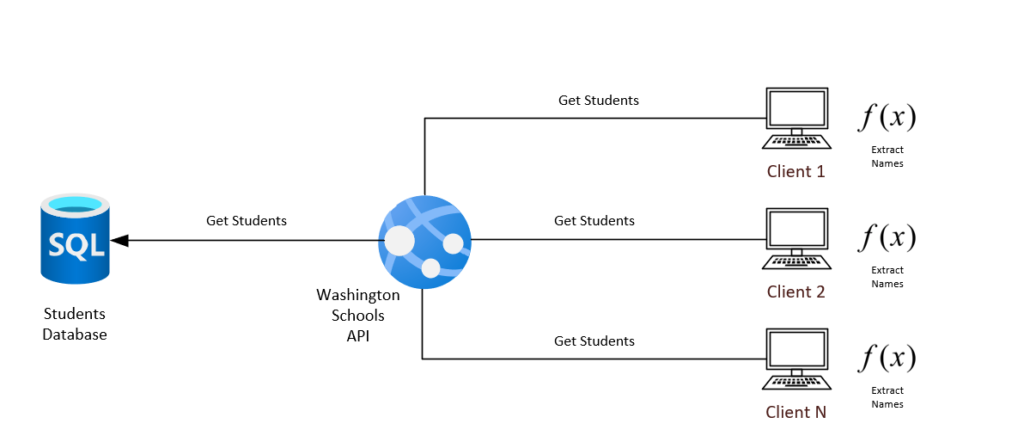
The problem with the architecture above, is that f(x) is being repeatedly applied for N number of clients, while repeatedly transferring unnecessarily large amounts of data from the server that eventually gets discarded on the client side.
In other words, the above architecture includes the cost of network traffic of large data sets in addition to the processing time.
Optimal Architecture
But with OData $select, the architecture would look like this:
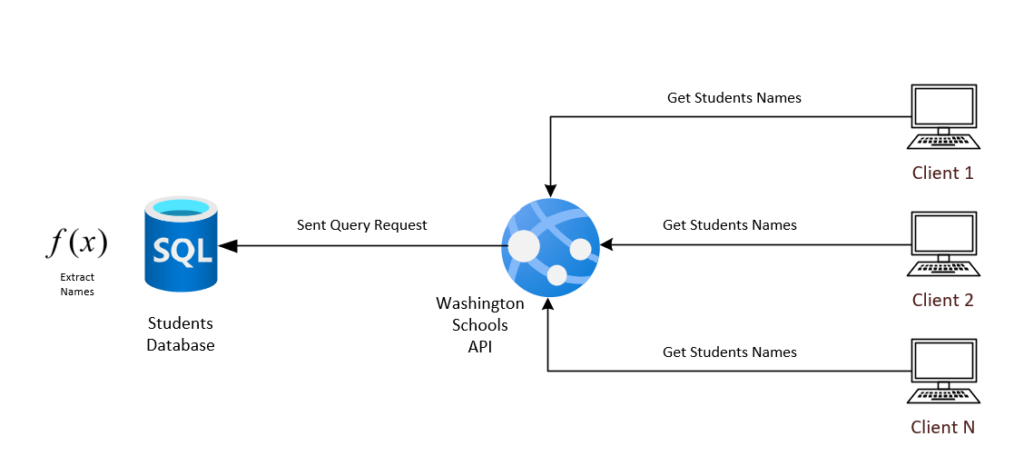
In that architecture we have exponentially decreased the cost of mapping the data from N to 1, we have also decreased the network traffic costs by minimizing the data transferred to only the required information which should eventually produce a better execution time holistically across the entire system, which will also guarantee consistent UI performance.
Disabling OData $Select
There comes a time when you need to disable certain functions like select for some given business need, mainly to enforce the entire model to be returned to your API consumers.
Disabling the Select functionality could be implemented in three different ways:
Endpoint Level
On a particular endpoint level, you can leverage the options the EnableQuery() annotation offers you to select which functionality you would like to allow or disallow, in this case Select will be disabled by applying the following parameter:
[HttpGet]
[EnableQuery(AllowedQueryOptions = Microsoft.AspNet.OData.Query.AllowedQueryOptions.None)]
public ActionResult<IQueryable<Student>> Get()
{
...
}
You can use the same parameter options to allow or disallow any number of query options you would like, which we will extensively talk about in the next articles.
Controller Level
The other option is to completely disallow Select on the controller level, but moving the EnableQuery() annotation with the same restrictions as we mentioned above to the controller level as follows:
[EnableQuery(AllowedQueryOptions = Microsoft.AspNet.OData.Query.AllowedQueryOptions.None)]
public class StudentsController : ControllerBase
{
...
}
Application Level
You can also disallow using Select query option across your entire application by removing the Select query parameter from your route builder setup as follows:
app.UseMvc(routeBuilder =>
{
routeBuilder.Select();
routeBuilder.MapODataServiceRoute("api", "api", GetEdmModel());
});
Final Notes
- There are so many great advantages in allowing your client to pick and choose which pieces of information they need from your API to fit their business.
- OData $select minimizes the effort on the client side when it comes to data mapping and processing, it handles all of that to ensure consistent user experience.
- The current implementation of OData can only support up to ASP.NET Core 2.2 and the team is working diligently to release OData for ASP.NET Core 3.0 by the 2nd Quarter of 2020.
OData Query Syntax
Query String Options
The Query Options section of an OData URI specifies three types of information: System Query Options, Custom Query Options, and Service Operation Parameters. All OData services must follow the query string parsing and construction rules defined in this section and its subsections.
4.1. System Query Options
System Query Options are query string parameters a client may specify to control the amount and order of the data that an OData service returns for the resource identified by the URI. The names of all System Query Options are prefixed with a "$" character.
An OData service may support some or all of the System Query Options defined. If a data service does not support a System Query Option, it must reject any requests which contain the unsupported option as defined by the request processing rules in [OData:Operations].
4.2. Orderby System Query Option ($orderby)
A data service URI with a $orderby System Query Option specifies an expression for determining what values are used to order the collection of Entries identified by the Resource Path section of the URI. This query option is only supported when the resource path identifies a Collection of Entries.
The $orderby section of the normative OData specification outlines the full expression syntax supported by this query option. The examples below represent the most commonly supported subset of that expression syntax.
Examples
https://services.odata.org/OData/OData.svc/Products?$orderby=Rating
- All Product Entries returned in ascending order when sorted by the Rating Property.
https://services.odata.org/OData/OData.svc/Products?$orderby=Rating asc
- Same as the example above.
https://services.odata.org/OData/OData.svc/Products?$orderby=Rating,Category/Name desc
- Same as the URI above except the set of Products is subsequently sorted (in descending order) by the Name property of the related Category Entry.
4.3. Top System Query Option ($top)
A data service URI with a $top System Query Option identifies a subset of the Entries in the Collection of Entries identified by the Resource Path section of the URI. This subset is formed by selecting only the first N items of the set, where N is an integer greater than or equal to zero specified by this query option. If a value less than zero is specified, the URI should be considered malformed.
If the data service URI contains a $top query option, but does not contain a $orderby option, then the Entries in the set needs to first be fully ordered by the data service. While no ordering semantics are mandated, to ensure repeatable results, a data service must always use the same semantics to obtain a full ordering across requests.
Examples
https://services.odata.org/OData/OData.svc/Products?$top=5
- The first 5 Product Entries returned where the Collection of Products are sorted using a scheme determined by the OData service.
https://services.odata.org/OData/OData.svc/Products?$top=5&$orderby=Name desc
- The first 5 Product Entries returned in descending order when sorted by the Name property.
4.4. Skip System Query Option ($skip)
A data service URI with a $skip System Query Option identifies a subset of the Entries in the Collection of Entries identified by the Resource Path section of the URI. That subset is defined by seeking N Entries into the Collection and selecting only the remaining Entries (starting with Entry N+1). N is an integer greater than or equal to zero specified by this query option. If a value less than zero is specified, the URI should be considered malformed.
If the data service URI contains a $skip query option, but does not contain a $orderby option, then the Entries in the Collection must first be fully ordered by the data service. While no ordering semantics are mandated, to ensure repeatable results a data service must always use the same semantics to obtain a full ordering across requests.
Examples
https://services.odata.org/OData/OData.svc/Categories(1)/Products?$skip=2
- The set of Product Entries (associated with the Category Entry identified by key value 1) starting with the third product.
https://services.odata.org/OData/OData.svc/Products?$skip=2&$top=2&$orderby=Rating
- The third and fourth Product Entry from the collection of all products when the collection is sorted by Rating (ascending).
4.5. Filter System Query Option ($filter)
A URI with a $filter System Query Option identifies a subset of the Entries from the Collection of Entries identified by the Resource Path section of the URI. The subset is determined by selecting only the Entries that satisfy the predicate expression specified by the query option.
The expression language that is used in $filter operators supports references to properties and literals. The literal values can be strings enclosed in single quotes, numbers and boolean values (true or false) or any of the additional literal representations shown in the Abstract Type System section.
Note: The $filter section of the normative OData specification provides an ABNF grammar for the expression language supported by this query option.
The operators supported in the expression language are shown in the following table.
| Operator | Description | Example |
|---|---|---|
| Logical Operators | ||
| Eq | Equal | /Suppliers?$filter=Address/City eq 'Redmond' |
| Ne | Not equal | /Suppliers?$filter=Address/City ne 'London' |
| Gt | Greater than | /Products?$filter=Price gt 20 |
| Ge | Greater than or equal | /Products?$filter=Price ge 10 |
| Lt | Less than | /Products?$filter=Price lt 20 |
| Le | Less than or equal | /Products?$filter=Price le 100 |
| And | Logical and | /Products?$filter=Price le 200 and Price gt 3.5 |
| Or | Logical or | /Products?$filter=Price le 3.5 or Price gt 200 |
| Not | Logical negation | /Products?$filter=not endswith(Description,'milk') |
| Arithmetic Operators | ||
| Add | Addition | /Products?$filter=Price add 5 gt 10 |
| Sub | Subtraction | /Products?$filter=Price sub 5 gt 10 |
| Mul | Multiplication | /Products?$filter=Price mul 2 gt 2000 |
| Div | Division | /Products?$filter=Price div 2 gt 4 |
| Mod | Modulo | /Products?$filter=Price mod 2 eq 0 |
| Grouping Operators | ||
| ( ) | Precedence grouping | /Products?$filter=(Price sub 5) gt 10 |
In addition to operators, a set of functions are also defined for use with the filter query string operator. The following table lists the available functions. Note: ISNULL or COALESCE operators are not defined. Instead, there is a null literal which can be used in comparisons.
4.6. Expand System Query Option ($expand)
A URI with a $expand System Query Option indicates that Entries associated with the Entry or Collection of Entries identified by the Resource Path section of the URI must be represented inline (i.e. eagerly loaded). For example, if you want to identify a category and its products, you could use two URIs (and execute two requests), one for /Categories(1) and one for /Categories(1)/Products. The '$expand' option allows you to identify related Entries with a single URI such that a graph of Entries could be retrieved with a single HTTP request.
The syntax of a $expand query option is a comma-separated list of Navigation Properties. Additionally each Navigation Property can be followed by a forward slash and another Navigation Property to enable identifying a multi-level relationship.
Note: The $filter section of the normative OData specification provides an ABNF grammar for the expression language supported by this query option.
Examples
https://services.odata.org/OData/OData.svc/Categories?$expand=Products
- Identifies the Collection of Categories as well as each of the Products associated with each Category.
- Is described by the Entity Set named "Categories" and the "Products" Navigation Property on the "Category" Entity Type in the service metadata document.
https://services.odata.org/OData/OData.svc/Categories?$expand=Products/Suppliers
- Identifies the Collection of Categories as well as each of the Products associated with each Category. In addition, the URI also indentifies the Suppliers associated with each Product.
- Is described by the Entity Set named "Categories", the "Products" Navigation Property on the "Category" Entity Type, and the "Suppliers" Navigation Property on the "Product" Entity Type in the service metadata document.
https://services.odata.org/OData/OData.svc/Products?$expand=Category,Suppliers
- Identifies the set of Products as well as the category and suppliers associated with each product.
- Is described by the Entity Set named "Products" as well as the "Category" and "Suppliers" Navigation Property on the "Product" Entity Type in the service metadata document.
4.7. Format System Query Option ($format)
A URI with a $format System Query Option specifies that a response to the request MUST use the media type specified by the query option. If the $format query option is present in a request URI it takes precedence over the value(s) specified in the Accept request header. Valid values for the $format query string option are listed in the following table.
| $format Value | Response Media Type |
|---|---|
| Atom | application/atom+xml |
| Xml | application/xml |
| Json | application/json |
| Any other IANA-defined content type | Any IANA-defined content type |
| A service-specific value indicating a format specific to the specific OData service | Any IANA-defined content type |
Examples
https://services.odata.org/OData/OData.svc/Products?$format=atom
- Identifies all Product Entries represented using the AtomPub format as defined in [OData:Atom]
https://services.odata.org/OData/OData.svc/Products?$format=json
- Identifies all Product Entries represented using the JSON format as defined in [OData:JSON]
4.8. Select System Query Option ($select)
A data service URI with a $select System Query Option identifies the same set of Entries as a URI without a $select query option; however, the value of $select specifies that a response from an OData service should return a subset of the Properties which would have been returned had the URI not included a $select query option.
Version Note: This query option is only supported in OData version 2.0 and above.
The value of a $select System Query Option is a comma-separated list of selection clauses. Each selection clause may be a Property name, Navigation Property name, or the "*" character. The following set of examples uses the data sample data model available at https://services.odata.org/OData/OData.svc/$metadata to describe the semantics for a base set of URIs using the $select system query option. From these base cases, the semantics of longer URIs are defined by composing the rules below.
Examples
https://services.odata.org/OData/OData.svc/Products?$select=Price,Name
- In a response from an OData service, only the Price and Name Property values are returned for each Product Entry within the Collection of products identified.
- If the $select query option had listed a Property that identified a Complex Type, then all Properties defined on the Complex Type must be returned.
https://services.odata.org/OData/OData.svc/Products?$select=Name,Category
- In a response from an OData service only the Name Property value and a link to the related Category Entry should be returned for each product.
- In a response from an OData service, only the Name of the Category Entries should be returned, but all the properties of the Entries identified by the Products and Suppliers Navigation Properties should be returned.
https://services.odata.org/OData/OData.svc/Products?$select=*
- In a response from an OData service, all Properties are returned for each Product Entry within the Products Entity Set.
- Note: The star syntax is used to reference all properties of the Entry or Collection of Entries identified by the path of the URI or all properties of a Navigation Property. In other words, the "*" syntax causes all Properties on an Entry to be included without traversing associations.
https://services.odata.org/OData/OData.svc/Categories?$select=Name,Products&$expand=Products
- In a response from an OData service, the Name property is included and Product Entries with all Properties are included; however, rather than including the fully expanded Supplier Entries referenced in the expand clause, each Product will contain a link that references the corresponding Collection of Supplier Entries.
Note: The $select section of the normative OData specification provides an ABNF grammar for the expression language supported by this query option.
4.9. Inlinecount System Query Option ($inlinecount)
A URI with a $inlinecount System Query Option specifies that the response to the request includes a count of the number of Entries in the Collection of Entries identified by the Resource Path section of the URI. The count must be calculated after applying any $filter System Query Options present in the URI. The set of valid values for the $inlinecount query option are shown in the table below. If a value other than one shown in Table 4 is specified the URI is considered malformed.
Version Note: This query option is only supported in OData version 2.0 and above
| $inlinecount value | Description |
|---|---|
| allpages | The OData MUST include a count of the number of entities in the collection identified by the URI (after applying any $filter System Query Options present on the URI) |
| none | The OData service MUST NOT include a count in the response. This is equivalence to a URI that does not include a $inlinecount query string parameter. |
Examples
https://services.odata.org/OData/OData.svc/Products?$inlinecount=allpages
- Identifies all Product Entries and the count of all products.
- Identifies the first 10 Product Entries that cost more than 200 and includes a count of the total number of Product Entries that cost more than 200.
5. Custom Query Options
Custom Query Options provide an extension point for OData service-specific information to be placed in the query string portion of a URI. A Custom Query String option is defined as any name/value pair query string parameter where the name of the parameter does not begin with the "$" character. Any URI exposed by an OData service may include one or more Custom Query Options.
Examples
https://services.odata.org/OData/OData.svc/Products?x=y
- Identifies all Product entities. Includes a Custom Query Option "x" whose meaning is service specific.
6. Service Operation Parameters
Service Operations represent functions exposed by an OData service. These functions may accept zero or more primitive type parameters. If a Service Operation requires an input parameter those parameters are passed via query string name/value pairs appended to the URI which identify the Service Operation as described in the Addressing Service Operations section. For nullable type parameters, a null value may be specified by not including the parameter in the query string of the URI.
Examples
https://services.odata.org/OData/OData.svc/GetProductsByRating?rating=5
- Identifies the "GetProductsByRating" Service Operation and specifies a value of 5 for the "rating" input parameter.